Friday, July 3, 2015

5 Actionable Analytics Reports for Internal Site Search

Posted by ryanwashere

I was furious when keyword data disappeared from Google Analytics (GA).

putersmash.gif

I mean, how could I possibly optimize a website without keyword data?!?!

It didn't take me long to realize I was overreacting. In fact, I quickly realized how trivial keyword data was.

Search engines are pretty damn good at what they do. If you properly optimize your content, people will find it with the keywords you intended. (You should set up an SEO dashboard in GA to verify your results.)

The truly valuable keywords are the ones visitors use within your site.

When mined correctly, internal terms uncover how and why users engage with content. These insights provide clear direction to improve content, SEO, and the user journey (resulting in increased conversions, leads, and sales).

In this post, I'll cover three things:

  1. How to set up internal search reporting in GA
  2. How to access and analyze five internal search reports in GA
  3. Two client case studies using internal search data

Prepping your analytics account

Before I get into the details, make sure you have the following set up in your GA account:

  1. Exclude internal traffic (filter). You wouldn’t believe how many organizations don’t do this. This simple filter makes all the difference when it comes to data quality. Make sure your website is excluding all internal traffic (step-by-step directions: how to set up internal filters in GA.)
  2. Goals, events and conversions. In order to discover user intent, we need to be able to segment reports by conversions. Make sure that your website has clearly defined key performance indicators (KPIs) that are represented by goals in GA (step by step directions: how to set up goals in GA.)

Supplemental reading: How to set up Google Analytics on your website

Setting up GA site search reporting

Standard GA implementation doesn’t have internal search reporting configured. In order to get the data, we need to input some information into GA manually.

Follow these steps to get it up and running:

  1. Navigate to the “Admin” tab
  2. Click “View Settings”
  3. Go to the bottom, where you’ll find “Site Search Settings”
  4. Click the button so that its setting is “On”

In order to complete the tracking, you’ll need to locate your site’s query parameter.

  1. In a new browser tab, open your website
  2. In your website's internal search bar, type the word "seo" and click "search"
  3. You will be redirected to your website's internal search landing page
  4. Look at the URL on the landing page (see screenshot below)
  5. You will see your search term, along with these characters: "?", "random letter", and "="
  6. The letter before the equal sign ("=") is your website’s query parameter
  7. Enter this value into the appropriate box in GA
  8. Click save

moz-10.png

EXAMPLE

Search query: seo
Landing URL: http://webris.org/?s=seo
Parameter
: ?s=seo
What to enter in GA: s
Screen Shot 2015-05-10 at 12.25.51 PM

GA will not post-date searches. In other words, searches that took place before you set up reporting won't populate. You will only get data from searches occur going forward.

For this reason, you'll need to wait about 30 days after setting up site search tracking in GA before analyzing the site search data. Otherwise, you won't have sufficient data to conduct meaningful analysis.

Analyzing the site search data

To access your site search data, navigate to Behavior > Behavior Flow > Site Search in GA.

There are five reports under Site Search:

  1. Overview
  2. Usage
  3. Search Terms
  4. Pages
  5. Any/All Reports (Segments)

Report #1: Overview

How to get there: Behavior > Behavior Flow > Site Search > Overview
What the report tells us:
Lists the high-level metrics related to your site’s internal search
Potential insights
:

  • Visits With Site Search, % Search Exits, and % Search Refinements: When looked at together, these metrics can tell you a lot about how visitors are finding content. If all three numbers are high, it likely means users can’t find what they‘re looking for.
  • Time after Search and Average Search Depth: Conversely, if these two metrics are high, it probably means users find a lot of value in your site search.
  • Overview (graph): Pay close attention to spikes and surges in internal searches. Were you running campaigns during this time? Use traffic segments to dig into causation.

Screen Shot 2015-05-10 at 12.22.50 PM


Report #2: Usage

How to get there: Behavior > Behavior Flow > Site Search > Usage
What the report tells us:
User journeys that used site search vs. those who didn’t
Potential insights
:

  • Pages/Session, Average Session Duration: If the pages viewed and session duration is higher with visitors using site search, this indicates your website has the right content (i.e., users are finding the content they are searching for). Keep a close eye on these metrics and test widgets, sidebars and "suggested article" plugins to help you figure out how to improve navigation.
  • Goal Completions: These are important metrics. Plain and simple, this tells us whether or not site search helps drive goal completions. If so, you may want to consider making your site search more prominent, or make it stand out with specific calls to action.
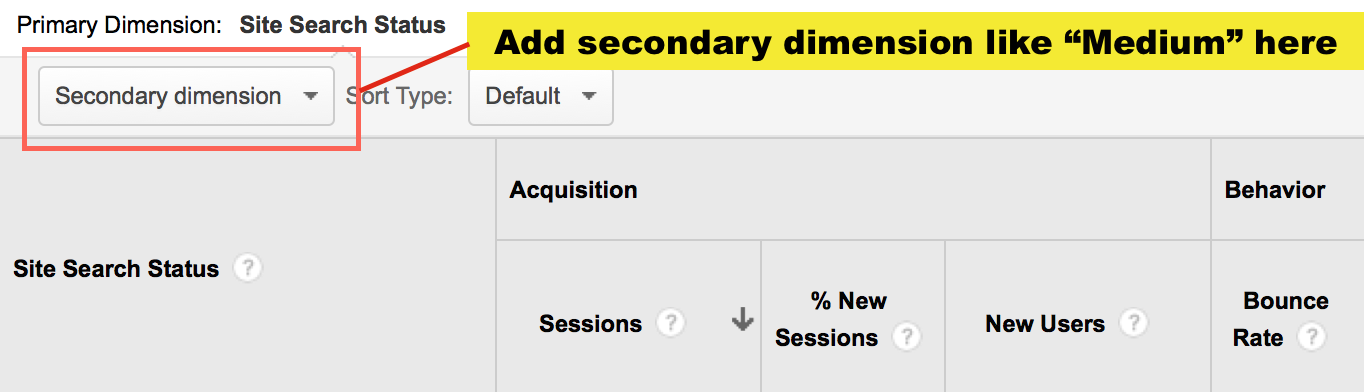
  • Secondary dimension: You can add a number of dimensions to this report to get deeper insight. I like to add "Medium"—it gives you a breakdown of each traffic medium, segmented by Visits With Site Search and Visits Without Site Search.
Screen Shot 2015-05-10 at 12.37.39 PM

Untitled-1


Report #3: Search terms

How to get there: Behavior > Behavior Flow > Site Search > Search Terms
What the report tells us:
Lists the most used search terms with corresponding engagement metrics
Potential Insight
:

  • Look at each engagement metric for discrepancies between search terms. If one search term has an abnormally high % Search Exits or % of Search Refinements, then you most likely don’t have content those visitors are looking for.
  • Look at the complete list of terms—are these included in your PPC and SEO keyword targeting strategies? If not, they should be. These are the terms your visitors expect to see on your site.
  • Add traffic channel segments to see which channel drives the most internal searches. These terms should match up with your PPC and SEO strategies. If a visitor is using site search to refine what they’re looking for, it could mean that they didn’t find your site from the right landing page.

Screen Shot 2015-05-12 at 11.05.25 AM


Report #4: Pages

How to get there: Behavior > Behavior Flow > Site Search > Pages
What the report tells us
: The pages users made their queries on
Potential insights
:

  • Overall: Looking at the overall picture of the data will show you where users are having problems finding content. Take a closer look at how your top pages are structured—can users find what they need?
  • Secondary dimension: I like to layer on the “Previous Page Path” dimension. This helps create a greater context for the problems users are have navigating your site.

Screen Shot 2015-05-12 at 11.03.24 AM


Report #5: Segments

How to get there: Behavior > Behavior Flow > Site Search > Any/All Reports

What the report tells us: Segments add additional depth and value. I often use the following segments to drive more insights:

  • Mobile traffic: Segmenting by mobile allows you to see visitors are using site search more from mobile. This can yield insights into mobile design and layout.
  • Converters or Made a purchase: Is site search driving conversions or adding roadblocks?
  • Organic traffic: What percentage of users that find your website through search engines need to refine their searches? The internal keyword searches are the keywords that users are really looking for when they find your site.
  • Returning users: Returning users are loyal—they enjoy your content enough to return for more. Use the internal search data to find out what content you need to best serve them.

Screen Shot 2015-05-12 at 11.01.26 AM


Case Studies: Driving action from internal search

The internal site search reports described above are high-level. Sometimes it takes seeing them in action to understand how to truly apply them.

As such, I've included two case studies that show exactly how I've used internal search data to drive meaningful action.

Case study #1

Site: Pop culture publisher (online only)
Marketing channels: SEO, social, and content

Problem:

  • The site drives traffic from five to eight daily blog updates about niche pop culture celebrities
  • In November, traffic stagnated, and then started to decline

Research:

  • The site thrives by creating content about niche celebrities, the ones few other sites write about. This gave them the monopoly on both the SERPs and avid social media fans
  • Digging in further, I found social traffic was steadily declining, while organic was remaining nearly the same, month-over-month
  • A full-scale content analysis was completed, finding that more and more content was being created about the same niche celebrities. This was causing diminishing returns on social and organic traffic.
  • The site suffered from content exhaustion: Writers were covering the same topics over and over.
  • In order to build traffic, they needed to scale efforts horizontally by creating content around new niche celebrities.

Solution:

  • I consulted the Search Terms report (Behavior > Behavior Flow > Site Search > Search Terms) to see what visitors were looking for on the site
  • By adding a filter for "no-results", I could see what content visitors were searching for on the site that turned up no results
  • I dumped this list into Excel, and had the writers create new content based on the search terms in the report

Screen Shot 2015-05-10 at 12.56.09 PM

Results:

After launch of the strategy, the site saw amazing results:

  • 201.05% increase in month-over-month traffic
  • 210.99% increase in month-over-month pageviews
  • 3.30% increase in pages per session
  • 3.15% increase in session duration
  • 4.75% decrease in bounce rate

Screen Shot 2015-05-10 at 1.03.41 PM55414b8408fb30.12050792

Up and to the right!

Case study #2

Site: Online travel site
Marketing channels: SEO, PPC, email, social, content, display, TV, radio, and print

Problem:

  • Large spike in month-over-month internal searches on client's site, with poor metrics for actions following internal searches
  • Both the search volume and search rate had nearly doubled (35,457 to 65,032; and 4.37% to 8.56%, respectively) month-over-month

Screen Shot 2015-05-10 at 1.08.20 PM

Research:

  • Digging in, I found traffic on-site increased by 40,000 month-over-month; when segmented, I found the increase was strictly organic traffic
  • Consulted GA Landing Pages report with Organic Segment to find which pages the increase in traffic was going to
    • (Behavior > Site Content > Landing Pages > Organic Segment)
  • This showed that 100% of the increase in month-over-month traffic went to the home page
    • This was out of the ordinary, as 80% of organic traffic generally goes deep into the site, not to the home page

Screen Shot 2015-05-12 at 11.25.12 AM

  • Next, I consulted the Google Webmaster Tools (GWT, recently rebranded as Google Search Console) Search Analytics report to see what keywords were driving the increase
    • (GWT > Search Traffic > Search Analytics)

Screen Shot 2015-05-10 at 1.13.02 PM

  • GWT analysis showed the increase came from queries consisting of branded keywords + "giveaway" (e.g., client giveaway promotion and client giveaway)

Solution:

  • I reported the findings to the client, and found out they'd been running a series of offline ads promoting a giveaway in attempts to generate email leads
    • Note: Large organizations often have employees, agencies, contractors, and consultants running for multiple efforts. It's not uncommon for efforts to operate in silos.
  • The giveaway was set up on a landing page that was difficult to find unless typed in directly (e.g., clientsite.com/giveaway)
  • I recommended that the client include a call-to-action on the home page that linked to the giveaway

Results:

  • Sessions with search decreased by nearly 10%
  • Results after search increased by 6.45%
  • Search depth increased by 9.01%
  • Most importantly, users were able to find the giveaway. Email leads increased by 245%!

case-study-2.png

Closing

When mined properly, internal search data will give you the information you need to greatly improve your web content, design, and search engine optimization efforts.


Sign up for The Moz Top 10, a semimonthly mailer updating you on the top ten hottest pieces of SEO news, tips, and rad links uncovered by the Moz team. Think of it as your exclusive digest of stuff you don't have time to hunt down but want to read!

Thursday, June 25, 2015

What to See, Do, and More at MozCon 2015 in Seattle

Posted by EricaMcGillivray

One of our favorite things about MozCon is introducing all of you to Seattle. We love our city, and besides three days of marketing learning, we also host three night events and facilitate other fun activities. We are currently 92% sold out with around 100 tickets left, so if you haven't already:

Buy your ticket now!

Check out the full schedule if you're interested in knowing more about the MozCon sessions.


Birds-of-a-feather tables at lunch

After many requests for more community connecting, this year, we're launching birds-of-a-feather tables during each lunch. There will be eight labeled tables with different topics each day and a different facilitator each day. (There are also a ton of unlabeled tables for random meeting and gatherings.) Sit down and join a conversation around a professional interest.

Roger and friends at MozCon

Table schedule

Monday tables:

  • Real Estate Marketers, hosted by Brittanie Flegle from Realty Austin
  • Manufacturing, hosted by Crystal Hunt from WTB, Inc.
  • Content Strategy, hosted by Ronell Smith from RS Consulting
  • Women in Digital Marketing, hosted by Susan Wiker from Fodor's Travel
  • In-house Marketers, hosted by Andy Odom from Santander Consumer USA Inc.
  • Local SEO, hosted by David Mihm from Moz
  • Inbound Marketing, hosted by Eric Hess from REI
  • SEO Executives, hosted by Benjamin Seror from SimilarWeb

Tuesday tables:

Wednesday tables:

Don't worry, with all of us in the same room, doing the same things for three days, you'll never miss a lunch or birds-of-a-feather opportunity!


Our official MozCon evening events

#MozCrawl: Monday night

Join us and our partners for a tour of the neighborhood bars in Belltown. This is our second official MozCrawl, and we're delighted to show off yet another part of Seattle. Each bar will feature a unique MozCon button. Collect all six and be entered in a drawing for a golden Roger. The crawl runs from 7-10pm. Make sure to bring your ID, US driver's license or passport.

(Standard disclaimer: Roger is golden, not made of gold.)

Locations

Buckley's, 2331 2nd Ave, hosted by Moz
Clever Bottle, 2222 2nd Ave Ste.100, hosted by wordstream
Rabbit Hole, 2222 2nd Ave, hosted by
unbounce
Lava Lounge, 2226 2nd Ave, hosted by whitespark
Wakefield Bar, 2137 2nd Ave, hosted by Moz
The Whiskey Bar, 2122 2nd Ave, hosted by kissmetrics

MozCrawl map


MozCon Ignite: Tuesday night

You've long asked for a networking-focused event, and in a Mozzy spirit, we're happy to bring our Tuesday night MozCon Ignite. Starts at 7pm with networking and appetizers with talks starting at 8pm.

Ignite talks are 5 minutes in length with auto-advancing slides. All these talks are passion topics—no marketing talks—so you can put your notebook down and relax. Get to know your fellow community members and their interests beyond our shared profession.

MozCon Ignite schedule:

7:00-8:00pm Networking
8:00-8:05pm Welcome to MozCon Ignite with Geraldine DeRuiter, aka the Everywhereist Geraldine DeRuiter
8:05-8:10pm Regales of an Accidental Nightcrawler Stunt Double with Jay Neill from Affiliate Resources, Inc.

Jay Neill is an online marketing consultant who helps businesses get started in the world of local SEO through education and servicing. In his spare time, Jay enjoys jumping on trampolines and playing with his vast collection of vintage Star Wars action figures.

Jay Neill
8:10-8:15pm Sled Dogs, Northern Lights, and Mushing Tails! with Anna Anderson from Art Unlimited

Anna Anderson is an avid dog lover who owns over 35 sled dogs in Northern MN. Growing up with sled dogs, she and her family now competitively race across North America: training, racing, and traveling for 2-3 months with 20 of her best canine friends across the country! Follow her on Twitter: @boldadgirl

Anna Anderson
8:15-8:20pm Performing a Canine C-Section with Marie Haynes from HIS Web Marketing

Dr. Marie Haynes is recognized as a leader when it comes to dealing with Google penalties and algorithm changes like Panda and Penguin. Prior to her career in SEO, she was a small animal veterinarian for 13 years. It is possible that her strong fear of birds is what launched her in to a new life of battling the Penguins at Google. Follow her on Twitter: @Marie_Haynes

Marie Haynes
8:20-8:25pm Bulltown Strutters: The Band That Married Its City with Mark Traphagen from StoneTemple Consulting

Mark Traphagen is Senior Director of Online Marketing for Stone Temple Consulting. When not disrupting things online, Mark disrupts the sleep of the good citizens of Durham, NC, by making as much noise as possible with the Bulltown Strutters, a New Orleans Second Line style parade band. Follow him on Twitter: @marktraphagen

Mark Traphagen
8:25-8:30pm Okay, I Have a Confession: I Was Homeschooled with Garrett Mehrguth from Directive Consulting

Garrett Mehrguth is digital marketing enthusiast and owner of Directive Consulting, which provides SEO, PPC, and Content for small to mid-market companies. When Garrett's not in the office, you can catch him playing foosball, surfing, or playing soccer. Follow him on Twitter: @gmehrguth

Garrett Mehrguth
8:30-8:35pm Conquering the 100 Best Books of All Time with Kristen Craft from Wistia

Kristen Craft is Director of Business Development and loves connecting with Wistia's partner community to spread the word about video marketing. In her spare time, she takes epically long walks, swims in ponds, and brews beer. Follow her on Twitter: @thecrafty

8:35-8:40pm Tales of Coffee from a Kitchen Window with Scott Callender from La Marzocco Home

Scott Callendar is the Director of the newly launched La Marzocco Home. He is the definition of a coffee geek and spends his time away from his job in coffee with his family and thinks more about coffee. Follow him on Twitter: @incognitocoffee

Scott Callender
8:40-8:45pm Go Frost Yourself: 7 Basic Frostings & Their Uses with Annette Promes from Moz

Annette Promes has spent the past two decades in and around Seattle working in various marketing roles. She is currently the CMO at Moz, where she and her teams handle everything that is "funnel-related," such as driving traffic to Moz's site, converting that traffic into product trials, and reducing customer churn. Annette really loves frosting. Follow her on Twitter: @ahpromes

Annette Promes
8:45-9:15pm Networking break
9:15-9:20pm A Creative Endeavor Inspires & Lengthens a Life with Ralph Legnini from DragonSearch

Ralph Legnini - Senior Creative Strategist at DragonSearch in NY - is an Aikido 5th Degree Black Belt Sensei, former Saturday Night Live music producer, President of the Board of Education in the 2nd largest school district in New York State, funky rock & roll guitar player, and has worked in the recording studio with music icons Mick Jagger, Madonna, David Bowie, Nile Rodgers, & Todd Rundgren. He used these unique combined skills to create a life sustaining environment for a talented 16-year-old boy with incurable cancer. Follow him on Twitter: @ruaralph2

Ralph Legnini
9:20-9:25pm Finding and Embracing Healthy Eating Habits with Carrie Hill from Ignitor Digital Marketing, LLC

Carrie Hill is the co-founder and technical SEO expert at Ignitor Digital. She loves cooking, eating, reading, and Eddie Vedder...not necessarily in that order. Follow her on Twitter: @CarrieHill

Carrie Hill
9:25-9:30pm I Was Told There Would Be Hoverboards. with Dan Petrovic from DEJAN

Dan Petrovic, the managing director of DEJAN, is one of Australia's best-known names in the field of search engine optimization. Dan is a web author, innovator, and a highly-regarded search industry event speaker. Follow him on Twitter: @dejanseo

Dan Petrovic
9:35-9:40pm The Day I Disremembered with Chris Hanson from 3GEngagement

Chris Hanson has been involved in digital marketing since 2006 and is currently Founder and CEO of 3GEngagement. After Hanson worked as a Park Ranger, lived without electricity, raced sled dogs, and lived in Alaska, he felt that digital marketing was the next obvious career move. Follow him on Twitter: @FollowUPsuccess

Chris Hanson
9:40-9:45pm What Did You Expect in an Opera, a Happy Ending? with Chrissi Reimer from Three Deep Marketing

A Green Bay native and Minneapolis transplant, Chrissi Reimer spends her days working as an SEO at Three Deep Marketing. Most nights, Chrissi can be found experimenting with different ways to prepare arugula, trying new brews, or taste-testing every ice cream option in the Twin Cities. Follow her on Twitter: @chrissireimer

Chrissi Reimer
9:45-9:50pm The Best Practices in Cooking Hot Dogs with Josh Couper from Rafflecopter

Josh Couper is the director of customer happiness at Rafflecopter and long time hot dog aficionado. Follow him on Twitter: @josh_couper

Josh Couper
9:50-9:55pm Raising My Parents with Jen Lopez from Moz

Jen Sable Lopez is the Director of Community at Moz. She is a renowned Community Strategist who started her marketing career as a technical SEO. Jen is a self-proclaimed geek and faux vegetarian, and she prides herself in having kicked colon cancer’s butt at the young age of 37. Follow her on Twitter: @jennita

Jen Lopez
9:55-10:00pm Stoned Nerd versus the Four-Legged Home Invaders with Ian Lurie from Portent, Inc.

Ian Lurie is founder and CEO of Portent, Inc., a search, social and content agency that helps clients become weird, useful, and significant. He's also a renowned raccoon wrangler. Follow him on Twitter: @portentint

Ian Lurie

Garage Party: Wednesday night

There ain't no party like a Moz party, and our annual bash at the Garage is always a blast. Have one last hurrah with us before heading home and back to work.

Garage Party

For those who've never been to the Garage, there's something for everyone: bowling, pool, and karaoke. Plus, a ton of food and drinks—including our featured MozCow Mule Mocktail, as well as well liquor, beer, house wine, and of course, our friend H2O. So whether you're singing your heart out, playing for the corner pocket, bowling a turkey, or just chatting with your new friends, we'll see you there.


Coming in early? See and explore Seattle!

Seattle by CheWei Chang

MozCon-adjacent activities

The following events are MozCon-adjacent, meaning they aren't hosted by Moz and attendees must arrange and pay for their adventures.

Alki Kayak Tours

Paddle around Elliott Bay! At 2:30pm Sunday, for $49/per person, you can head out on the water and make new MozCon friends. You can easily catch the water taxi at Pier 50 ($4.75 one-way) from Downtown to West Seattle. Alki tours is located right next to the West Seattle ferry terminal for your convenience.

Local Craft Tours

Take a distillery tour at 12pm Sunday and learn about Seattle's unique craft culture. Conveniently, the tour leaves from the Grand Hyatt Hotel. You can call (206) 455-3740 to reserve your spot on the tour, which costs $87.50/per person.

Seattle Mariners vs. Los Angeles Angels

Love baseball? Come see Seattle's home team play. The Mariners game starts at 1:10pm, and you can see them take on the Angels for $17/per person on the View Level. You must purchase your ticket before 5pm July 10 in order to get the MozCon deal. Enter 'MOZCON' as your special offer code.


Citywide events


Mozzers recommend their favorite Seattle destinations!

Rachael KloekAgua Verde, recommended by Rachael Kloek

"Agua Verde serves great Mexican food in a beautiful lakefront setting. You can rent paddleboards and kayaks right under the restaurant to paddle your way around Lake Union."

Chris LoweBallard brewery blocks, recommended by Chris Lowe

"A dozen really good breweries all within a few blocks of each other: Stoup, Reubens, Red Envelope, Populuxe, Peddler, Maritime, etc., etc. You can easily walk from one brewery to another. Bonus is that most of these breweries host food trucks on the weekends. The area is also just a few blocks from downtown Ballard and the Burke Gilman Trail."

Renea NielsenBallard Locks, recommended by Renea Nielsen

"The Ballard Locks are a bit of a trek from downtown Seattle (~ 45 min. by bus), but they are a perfect Seattle maritime adventure. The Locks abut a beautiful park and show off Seattle's maritime history. If you're lucky, you may even find some sea lions playing in one of the closed Locks."

Erica McGillivrayPike Place Market, recommended by Erica McGillivray

"May seen like a 'touristy' spot, but Pike Place Market actually thrives on local business. Every day, there's a farmer's market, flowers galore, and artisans on everything from cheese and spices to woodworking and jewelry. There are hidden shops (at least three bookstores) and a ton of great food."

Rand FishkinElliot Bay Books, recommended by Rand Fishkin

"One of the best indie bookstores in the country, stocked with good stuff to buy and read, and there's a lovely cafe, too."

Nemecia KaloperFerry ride, recommended by Nemecia Kaloper

"Takes you to such cool places and allows you to see the city from different view and get a taste of our awesome islands! It requires usually at least 1/2 a day, but is well worth it to be able to hop over and have lunch somewhere other than the city. It's easy to never take the trip, but well worth it if you do. I recommend Bainbridge in particular and Nola Cafe."

Kevin LoeskenThe Fremont Troll, recommended by Kevin Loesken

"The Fremont Troll, and Fremont in general, perfectly sums up what's great about Seattle. The troll itself is an amazing piece of art. It's also near the Lenin Statue and close to a lot of interesting bars, restaurants, and shops."

David LeeRodeo Donuts!, recommended by David Lee

"Best donuts ever. Even better than Voodoo in Portland, OR. This needs to be a 150 characters long so once again, best donuts ever. I really like the donuts here. Don't go to Krispy Kreme or Top Pot."

Abe SchmidtVivace: the Cafe Nico, recommended by Abe Schmidt

"The Cafe Nico best coffee drink in this city. Orange/nutmeg/ cinnamon paired with the greatest espresso pull in the country (only machine in the world capable of the 'perfect' espresso shot)."

Ben SimpsonStarbucks Roastery, recommended by Ben Simpson

"Just a few blocks from the convention center, the Starbucks Roastery is one of biggest new attractions in Seattle. Why? To start, walking it it feels like Willy Wonka had one to many espresso shots and got inspired. Starbucks pulled together its best baristas from around the country to put together some amazing craft coffee creations. And to top it all off, they've got a Serious Pie on location making all of their delicious food. If you do nothing else during your visit, the Starbucks Roastery is an absolute must!"


And Mozzer favorite restaurants and bars opened since last MozCon

Looking for more options? Don't miss our quintessential post from last year, our mega post from 2013, Rand's personal recommendations, and Jon Colman's Seattle coffee guide.


Buy your ticket now!


Sign up for The Moz Top 10, a semimonthly mailer updating you on the top ten hottest pieces of SEO news, tips, and rad links uncovered by the Moz team. Think of it as your exclusive digest of stuff you don't have time to hunt down but want to read!

Thursday, June 18, 2015

New Features in OSE's Spam Score & the Mozscape API

Posted by randfish

This week, we launched a feature inside Open Site Explorer that I'm very excited about - the Spam Score Histogram, found by clicking on the "spam analysis" tab:

The histogram is particularly useful for visualizing the distribution of potentially spammy links that show up in a site's link profile. Above, for example, we're looking at Moz.com, with a strong distribution of sites that have 0-5 spam flags. According to our research, that means the vast majority of those sites are unlikely to be penalized or banned by Google.

For more detail on Moz's Spam Score, check out the original blog post and my Whiteboard Friday.

The new histogram view lets us do nice comparisons like these:

Houzz.com has a very large list of sketchy-looking sites linking to them (many seem to be very thin content sites from China, curiously).

Competitor (well, sort-of-competitor), Porch.com, has a much smaller link profile with a very different distribution. Their link profile looks even healthier than Moz's to me!

But, the new spam score histogram isn't the only new feature. We've also got a new power available to API users - the ability to query data from the previous index. If you want to know what a previous Domain Authority score looked like, or how many links we reported to a page in our last index, you can now do so using the Moz API. If you want to get started, check out the documentation here, or get in touch directly with Chris Airola (email chris.airola at moz.com), who manages paid API accounts and loves to help.

Many thanks to the Research Tools and Big Data teams at Moz, who've worked to make this possible. I'm happy to answer questions and will try to be in the comments here frequently. I wish you good spam exploring my friends!


Sign up for The Moz Top 10, a semimonthly mailer updating you on the top ten hottest pieces of SEO news, tips, and rad links uncovered by the Moz team. Think of it as your exclusive digest of stuff you don't have time to hunt down but want to read!